
Local‑first AI workflow
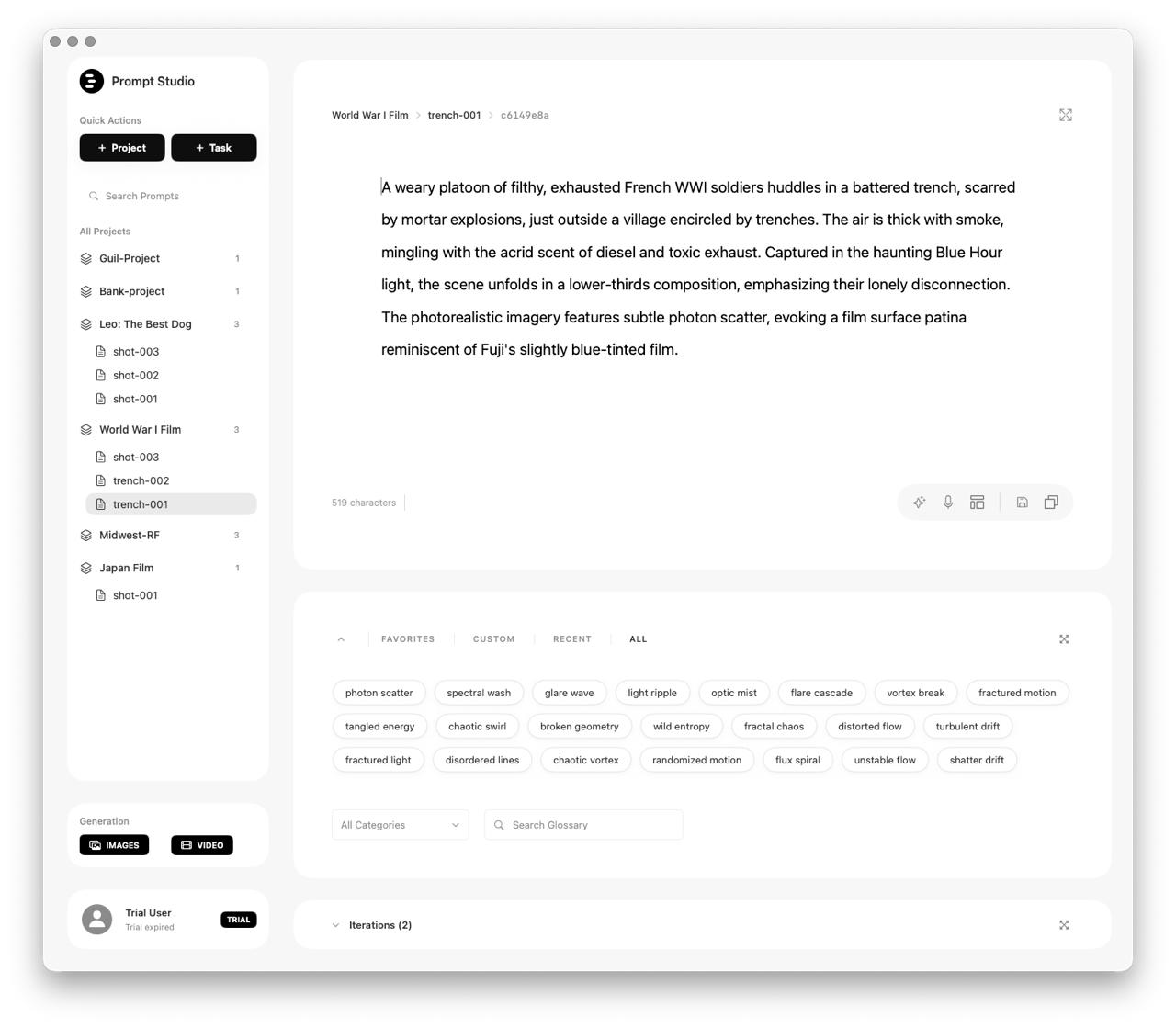
Prompt Studio captures the creative process behind AI images.
A local‑first workspace that saves every prompt, iteration, and output — so your team can trace, curate, and reuse the work that matters.
Local‑first by design
Your data stays on your machine. No forced cloud. No surprises.
Process, not just outputs
Track prompts, batches, and assets together to understand how results were made.
Built for serious creative work
Designed for filmmakers, studios, and agencies managing real production workflows.
Features that respect the creative process.
Prompt Studio captures prompts and outputs in a local‑first system designed for real production work.
1
Prompt + Asset Capture
Capture prompts and the exact outputs they generate — images and videos — with clean linkage between them.
2
Iterations & Batches
Group generations into batches so you can track exploration without losing your place.
3
Gallery + Review
Browse everything in a fast, local gallery built for curation.
4
Templates & Reuse
Reuse strong prompts and patterns across projects to speed up ideation.
5
Local‑first Privacy
All data is stored on device by default. Designed for sensitive creative work.
6
Proof of Existence (Bitcoin‑anchored)
Generate a cryptographic certificate for a prompt and anchor it via OpenTimestamps to the Bitcoin blockchain for independent verification.
7
Cinematic Glossary + Smart Templates
Insert professional film language instantly—lenses, lighting, mood, composition, texture, and style—using a curated glossary. Templates map directly to glossary categories, so as you tab through a template, the right cinematic terms are suggested and one‑click inserted.












Made for filmmakers, studios, and agencies.
Filmmakers & Story Teams
Track prompts and outputs across concept art, previs, and pitch materials.
AI Art Studios
Keep high‑volume generations organized and easy to review.
Creative Agencies
Build consistent client workflows with traceable creative provenance.
Research & Education
Document experiments with full prompt context and repeatable outputs.
How it works
1) Install Prompt Studio
Download and run the macOS app.
2) Capture prompts + outputs
Everything is stored locally and grouped into meaningful batches.
3) Organize and reuse
Curate what matters and reuse proven prompt structures.
Pricing structure
Placeholder tiers for now. Final pricing and packaging coming soon.
Solo
For individual creators exploring AI workflows.
Studio
For teams building production‑grade pipelines.
Enterprise
For larger organizations with security and compliance needs.
FAQ
Is my data stored in the cloud?
No. Prompt Studio is local‑first — your data stays on your machine by default.
Can I export prompts and outputs?
Yes. You can export your prompts and assets for archiving or sharing.
Which platforms are supported?
Currently macOS. Other platforms may follow.
What is “Proof of Existence”?
It creates a cryptographic, independently verifiable timestamp that a prompt existed at or before a given time, with optional Bitcoin anchoring.
How do templates work?
Templates connect to the glossary so each placeholder can suggest the right cinematic terms, letting you fill in a prompt quickly and consistently.
Download Prompt Studio for macOS
Get the local‑first workflow for capturing AI prompts and outputs.